LifeSG credits for children: How to Claim and Where to Use (2026 guide)

The Lendela Team
August 2nd, 2026
Table of contents
- This is a second, separate round announced at Budget 2026, distinct from the 2025 round that has now expired
- Eligible amount: $500 per Singapore Citizen child aged 0–12 (children born 2014–2025), disbursed from 14 July 2026
- Access the credits: Automatically credited to the CDA parent's LifeSG app, no application needed.
- Where you can spend it: Use at any PayNow UEN or NETS QR merchant.
- Need cash instead? : Cash out via YouTrip QR and transfer the balance to your bank account.
- Children born in 2026: credits disbursed from April 2027 (eligibility assessed 1 March 2027)
- Valid for approximately 12 months from disbursement, no extension
- Need extra funds?: Use Lendela to find loan options tailored to your profile.
Raising a child in Singapore is a joyful yet financially demanding journey. From diapers and formula to enrichment classes and healthcare, the costs add up quickly. That’s why the government’s recent initiative to provide S$500 LifeSG credits per eligible child is a welcome relief for many families.
These credits can be used at everyday merchants or withdrawn as cash for more flexible use. This guide will walk you through:
Who qualifies
How to access and use the credits
A smart hack to cash it out
And tips to stretch the value of these credits
If you’re a parent exploring bigger financing needs - such as for education, medical bills or home improvements, Lendela is Singapore’s preferred loan matching platform designed to match you with loan options tailored to your needs. It’s free and totally private.
What are the LifeSG Credits?
Update: A second $500 round of LifeSG credits was announced at Budget 2026, following an earlier round in 2025. Each eligible child qualifies for $500, credited directly to the CDA trustee's LifeSG app from 14 July 2026. The credits are valid for approximately 12 months from disbursement, with no extension. They are non-transferable and cannot be withdrawn directly into a bank account (though there are workarounds, covered below).
These credits give families the flexibility to cover daily essentials or invest in their child’s development, depending on your needs.
Who qualifies for the $500 LifeSG Credits?
To be eligible:
Your child must be a Singapore Citizen
Aged 12 or younger as of 1 June 2026
Must have an active Child Development Account (CDA) as the credits will be given to the trustee of the CDA account
Credits are automatically issued to the parent who is listed as the trustee of the CDA. This is usually the parent who set up the account. So if you don’t see the credits in your LifeSG app, ask your spouse or co-parent to check theirs.
🧾 Each child up to 12 years old is eligible to receive $500. If you have three eligible children, you’ll receive a total of $1,500.
What if my child is born in 2026?
Parents of babies born in 2026 won’t receive the credits right away, but the government has confirmed that these children will be included.
Once the CDA is set up and verified (typically within a few weeks of birth), the LifeSG credits will be disbursed according to the following: Children born in 2026 get theirs from April 2027, assessed 1 March 2027.
In the meantime, new parents should:
Download the LifeSG app which is needed to register your child’s birth
Complete CDA application via POSB/OCBC/UOB
Ensure their Singpass and bank details are updated
What is the LifeSG App used for?
The LifeSG app is your go-to platform for accessing government services and benefits for parents. Besides credits, the app helps you:
Track your child’s immunisation records
Find and register for preschools
View medical appointments
Book ActiveSG sports facilities
Access Baby Bonus and CDA balance
How to access your credits
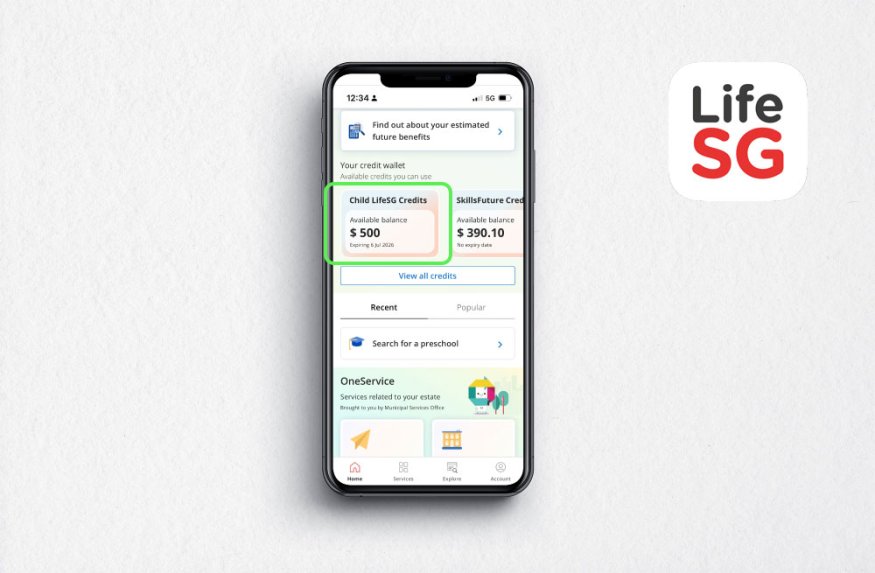
Open the LifeSG app
Log in via Singpass
Your child’s credits will appear on the home screen or under their profile
Where can you spend LifeSG credits?
LifeSG credits are incredibly versatile and can be used at any merchant that supports PayNow UEN QR or NETS QR. That’s welcome news as you have full flexibility to use it across merchants and categories, not just for groceries.
Here are some examples:
Category | Examples |
Groceries | NTUC FairPrice, Sheng Siong, Cold Storage |
Dining | Toast Box, McDonald’s, Sushiro, Mr Coconut |
Retail | Popular, Kinokuniya, 7-Eleven |
Education | Tuition and enrichment centres (via PayNow UEN) |
Bills | Utilities via AXS machines |
You can even use it for school fees or extra classes if the service provider accepts PayNow UEN payments. However, hawkers and small vendors using personal PayNow QR codes may not be compatible.
Get Your Loan Options
Find tailored offers in minutes — free to check, with no impact on your credit score.


Step-by-Step: How to use your LifeSG credits at merchants
Not sure how to use your LifeSG credits at a store or service provider? Don’t worry, here’s a simple step-by-step guide to help you spend your credits seamlessly through the LifeSG app.
Remember: The merchant must support PayNow UEN QR or NETS QR payments. You cannot use LifeSG credits on vendors who only accept personal PayNow (e.g. via mobile number).
Step 1: Confirm the merchant accepts PayNow UEN or NETS QR
Look for signs that say PayNow UEN QR accepted or NETS QR.
If unsure, ask the cashier or service staff whether they accept LifeSG credits via QR.
You can also check if their QR code includes a UEN (Unique Entity Number) a good indicator it's eligible.
Step 2: Open the LifeSG app
Launch the LifeSG app on your phone.
Log in using Singpass if prompted.
Ensure your credits are reflected under the child’s profile on the homepage.
Step 3: Tap “Scan QR code to pay”
On the LifeSG home screen, tap the “Scan QR code to pay” button.
This opens your phone camera.
Step 4: Scan the merchant’s QR code
Point your camera at the PayNow UEN QR or NETS QR code provided by the merchant.
Wait for the system to detect and validate the payee.
You should see the merchant name and UEN displayed for confirmation.
Step 5: Enter the payment amount
Key in the total amount you’re paying (e.g., $23.40).
Review the details carefully, and make sure it’s the correct merchant and amount.
Step 6: Confirm payment using LifeSG Credits
Tap “Pay with LifeSG Credits” when prompted.
Authorise the payment using your phone's biometric or passcode.
A confirmation screen will appear once the transaction is successful.
That’s it! You’ve successfully used your LifeSG credits.
Hack: Withdraw LifeSG credits as cash using YouTrip
If you’d rather not worry about where and how to spend your credits, you can convert them to cash using a YouTrip account. This allows more flexibility, especially for those who want to save the money, or transfer it into a child’s savings account.
Step-by-Step Guide
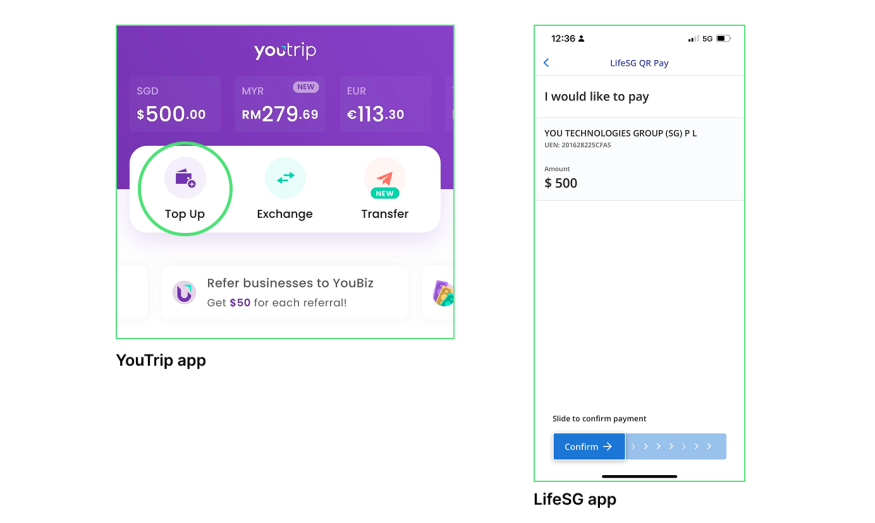
1. Generate a QR Code in YouTrip
Open YouTrip app
Tap Top Up
Enter the amount (e.g., $500)
Tap Generate QR Code
Save the image to your phone
Scan the QR Using LifeSG
Open LifeSG app
Tap “Scan QR code to pay”
Scan the QR from YouTrip
Confirm payee: YOU TECHNOLOGIES PTE LTD (UEN: 201628225C)
Confirm and pay
What are the best ways to spend LifeSG credits?
Once the credits are in your bank account, you have full freedom to decide how to use it. This could be:
Depositing into your child’s CDA to earn base interest and government co-matching
Starting a junior investment plan
Paying for medical expenses, investment plans, school fees or supplies
Keeping it as emergency funds
Parenting comes with many unplanned costs. A sudden clinic visit, a lost water bottle, or an extra school trip. Having that buffer gives you peace of mind.
And if you find yourself needing more structured financial help, whether for larger expenses like renovation, education loans, or debt consolidation, consider Lendela. You’ll be matched with the best available loan offers from 70+ licensed lenders, all in one place, with no cost to you.
Budgeting your credits wisely
Not sure how to allocate the $500? Here's a sample breakdown:
Expense Type | Suggested Allocation |
Groceries & meals | $150 |
Tuition or classes | $200 |
Emergency savings | $100 |
Family outing treat | $50 |
Ultimately, you know your child’s needs best. The flexibility of these credits is that they support your judgment, whether you want to invest for the long term, cover day-to-day expenses, or save for a rainy day.
Final Thoughts
Raising children in Singapore isn’t cheap, and every little bit helps. These $500 LifeSG credits offer a helpful cushion to lighten the financial load for parents across the country.
Whether you choose to spend, save, or withdraw, what matters is that you use them wisely before they expire. If you're planning your next financial move, platforms like Lendela help you explore competitive loan offers from top loan providers, completely free and with no obligation.
So don’t wait. Make the most of your credits, and take control of your family's finances today.
Frequently Asked Questions
Do I need to apply for the LifeSG credits?
No. Credits are automatically credited to the CDA trustee's LifeSG app, no application needed.
What if I can't find the credits in my LifeSG app?
Credits go to whichever parent is listed as the CDA trustee. If you don't see them, check with your spouse or co-parent, they may be the registered trustee.
Can I withdraw LifeSG credits as cash?
Not directly. Credits are non-transferable to a bank account, but a workaround using YouTrip lets you convert them to cash, covered in this guide.
Do the credits expire?
Yes, they're valid for approximately 12 months from disbursement, with no extension.
Is this the same as the 2025 LifeSG credits round?
No. This is a second, separate $500 round announced at Budget 2026. The 2025 round has already expired.
More 2026/27 Government Support You May Qualify For
The Lendela Team
Lendela is a loan-matching platform that partners with 70+ banks and financial institutions. We aim to deliver a transparent, safe, and personalised loan-matching experience, empowering borrowers with confidence to choose what truly fits. Since launching in 2018, we’ve helped hundreds of thousands of Singaporeans make smarter, more informed financial decisions through clarity and control.