
The Lendela Team
October 27th, 2026
Table of contents
- One example stack of six streaming and cloud subscriptions costs about $91 a month, or $1,096.68 a year, about $3 a day, at October 2026 Singapore prices.
- Premium tiers cost $48 to $84 a year more than Standard on Netflix, Disney+ and HBO Max. Netflix has no annual plan, while Disney+ and HBO Max annual plans save $44 to $68 a year on Standard.
- YouTube Premium Lite is $8.98 a month against $15.98 for Premium, $84 a year less, though it includes fewer features. Google AI Pro at $28.99 a month includes 5 TB and the Lite plan, with availability varying by country.
- Keeping Netflix, Disney+ and HBO Max Standard one at a time for four months each costs $225.76 a year instead of $677.28, an illustrative saving of $451.52.
- Running your own photo server or subscription tracker on a Raspberry Pi is possible but not free, and Pi-hole can't block YouTube ads.
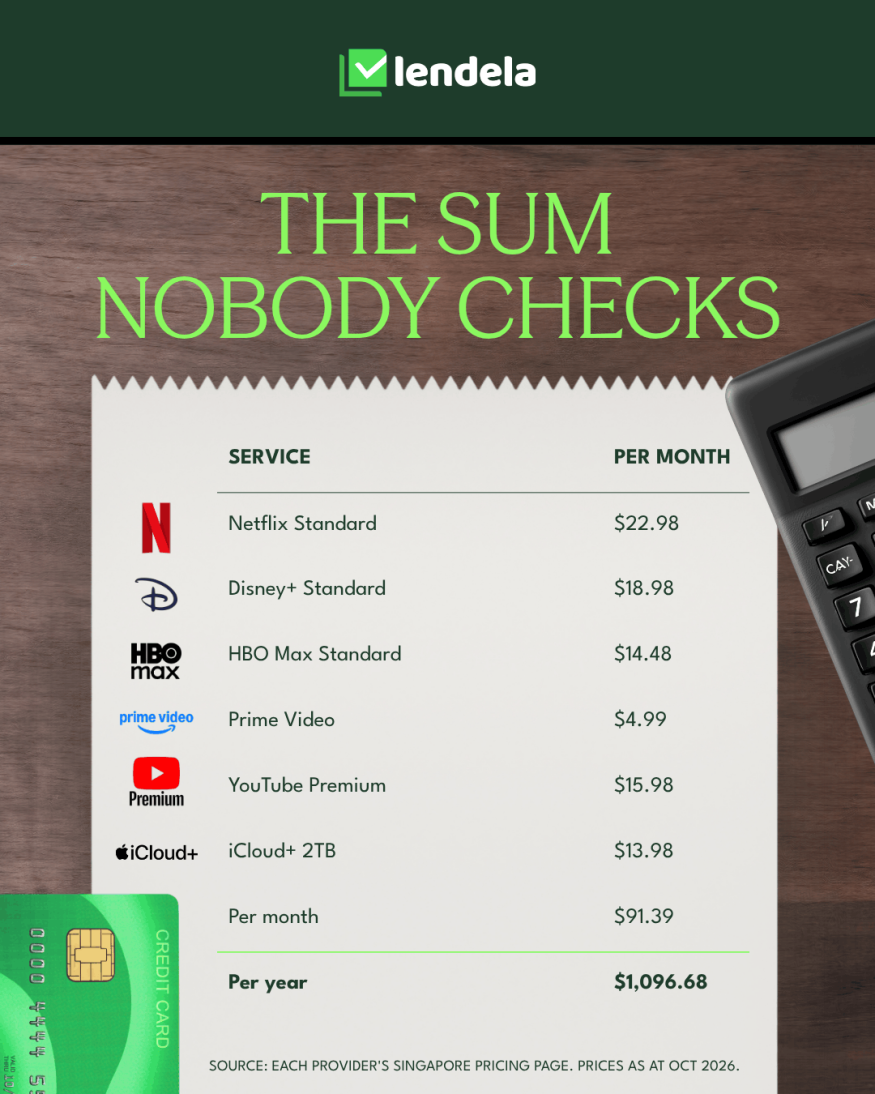
A typical stack of streaming and cloud subscriptions in Singapore comes to about $91 a month, or $1,096.68 a year. That's six services at their mid-tier prices, all read from the providers' own Singapore pages in October 2026:
Netflix Standard at $22.98
Disney+ Standard at $18.98
HBO Max Standard at $14.48
Prime Video at $4.99
YouTube Premium at $15.98
iCloud+ 2TB at $13.98
That works out to about $3 a day. Nobody has to cut all six. The savings tend to sit in four places:
The tier you're on. Moving down one tier saves $48 to $84 a year.
How you pay for it. Where an annual plan is offered, it saves about $10 to $86 a year.
Services that overlap. Two cloud plans, or a bundle you already have.
The months you're not watching. Rotating three services one at a time saves around $450 a year in the example below.
Dropping a subscription you haven't opened in 30 days saves the full price. After those, the guide gets to the less obvious options: a cheaper YouTube plan, a Google bundle that includes it, and a few things you can run yourself on a Raspberry Pi.
Prices are as at 26 October 2026. Apple TV's price couldn't be confirmed from its own page, so it isn't included.
How much do streaming and cloud subscriptions cost in Singapore?
Most of us know what each subscription costs, and almost none of us know what they cost together. Here are the plans on offer from each provider's own Singapore page:
Service | Plans and monthly prices |
|---|---|
Netflix | Basic $15.98, Standard $22.98, Premium $29.98. Extra member $7.98 |
Disney+ | Standard $18.98, Premium $22.98 |
HBO Max | Standard $14.48, Premium $18.98 |
Prime Video (Amazon Prime) | $4.99, with a 30-day free trial |
YouTube | Premium Lite $8.98, Premium $15.98, Student $9.98, Family $31.98 |
iCloud+ | 50GB $1.48, 200GB $3.98, 2TB $13.98, 6TB $42.98, 12TB $84.98 |
Google (storage with AI) | Google AI Plus 400 GB $6.98, Google AI Pro 5 TB $28.99 |
Take the mid-tier plan from six of them and the total looks like this:
Service | Per month | Per year |
|---|---|---|
Netflix Standard | $22.98 | $275.76 |
Disney+ Standard | $18.98 | $227.76 |
HBO Max Standard | $14.48 | $173.76 |
Prime Video | $4.99 | $59.88 |
YouTube Premium | $15.98 | $191.76 |
iCloud+ 2TB | $13.98 | $167.76 |
Total | $91.39 | $1,096.68 |
That's one example, not a recommendation, and yours will look different. The useful part is the shape: a few small monthly charges, none of which feels like much, that add up to a figure most of us have never actually seen written down.
Which tier are you actually paying for?
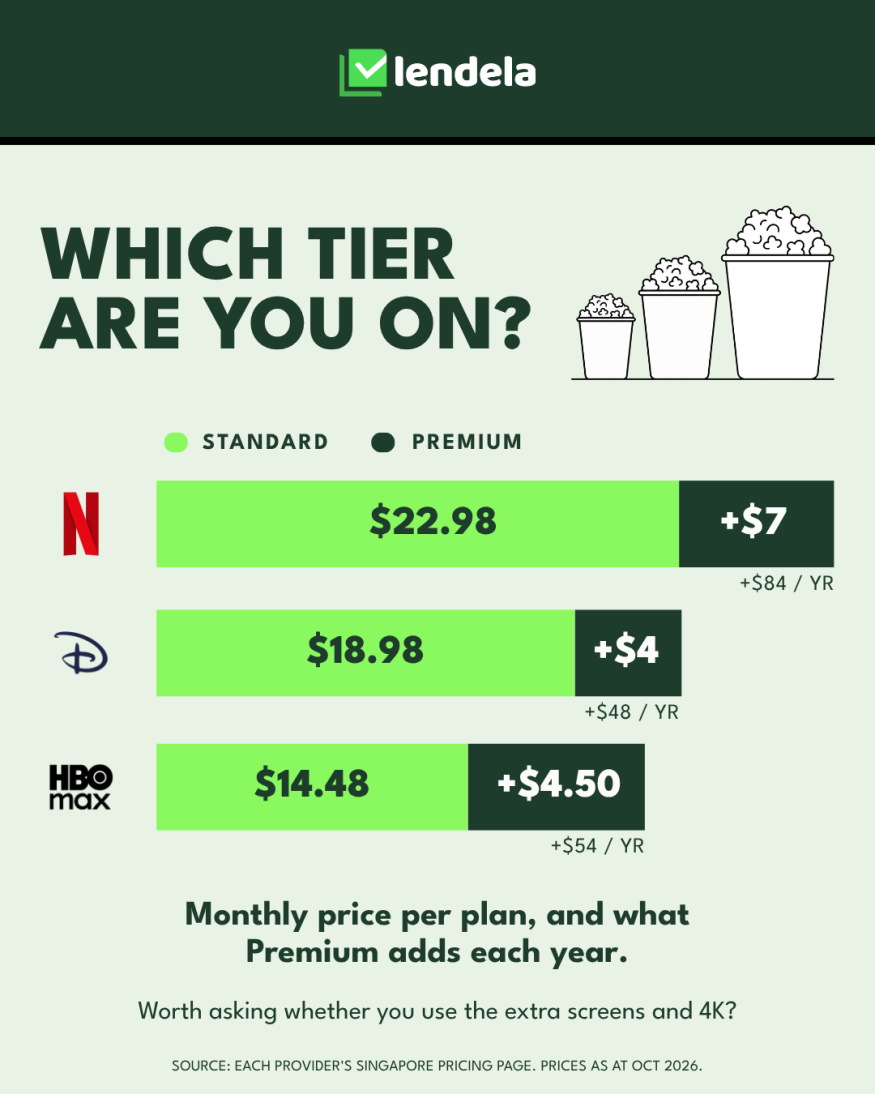
The first place to look is the one most people skip: the plan you picked when you signed up. Premium tiers mostly add more screens at once and 4K, which matter if the household really uses them and not at all if it doesn't.
Service | Standard | Premium | Premium costs extra, per year |
|---|---|---|---|
Netflix | $22.98 | $29.98 | $84 |
Disney+ | $18.98 | $22.98 | $48 |
HBO Max | $14.48 | $18.98 | $54 |
A few less obvious charges sit around the edges of these plans:
Netflix Basic: $15.98 a month, which is another $84 a year below Standard.
Netflix extra member: $7.98 a month, listed as an add-on on Netflix's Singapore help page.
YouTube Family: $31.98 a month, covering up to five family members aged 13 and above in the same household.
YouTube Student: $9.98 a month.
If several people in your household each pay for their own YouTube Premium, a single Family plan is worth comparing.
Is it cheaper to pay for streaming annually?
Once you've settled on a tier, the next lever is how you pay for it. Three of the services offer an annual plan, paid upfront, and the saving is real:
Plan | 12 months, paid monthly | Annual plan | You save |
|---|---|---|---|
Disney+ Standard | $227.76 | $159.98 | $67.78 |
Disney+ Premium | $275.76 | $189.98 | $85.78 |
HBO Max Standard | $173.76 | $129.98 | $43.78 |
HBO Max Premium | $227.76 | $169.98 | $57.78 |
Prime Video | $59.88 | $49.90 | $9.98 |
Netflix | $275.76 (Standard) | No annual plan | Not available |
Disney+ describes its annual saving as about 29% on Standard and about 31% on Premium. HBO Max says up to 25%.
The catch is paying upfront. An annual plan only pays off if you would have kept the service all year. If you stop watching in month five, the money is already spent.
It suits the service you open every week, and not the one you open for a single series.
Netflix doesn't offer annual plans at all, according to its own help centre.
Are you paying twice for the same thing?
Tier and billing change what you pay for a service you want. This section is about services you may not need at all, and overlap is usually where the easiest saving hides.
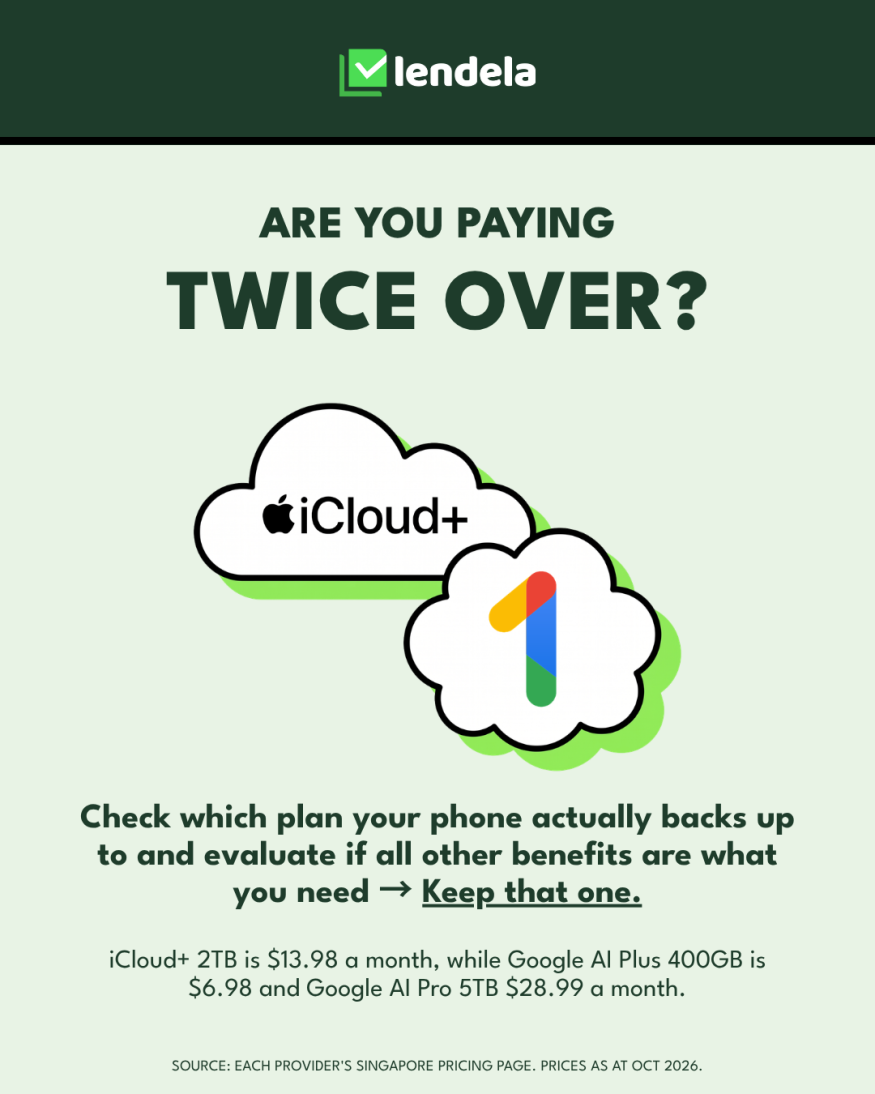
The clearest example is cloud storage. It's common to end up with two plans running side by side: iCloud+ because the iPhone offered it, and a second plan from another provider because a work laptop or an old Android phone started it. Both can quietly hold the same photos.
iCloud+ 2TB is $13.98 a month on Apple's Singapore page. Plans of 200GB and above can be shared with your Family Sharing group.
Google AI Plus is $6.98 a month for 400 GB, and Google AI Pro is $28.99 a month for 5 TB, on Google's Singapore page.
They aren't like-for-like with a 2TB plan, so compare the storage you actually use, not the headline price.
Keep the plan your phone actually backs up to, and see whether the other is still needed.
There are four other overlaps worth checking:
Where it overlaps | What to check |
|---|---|
Storage plus YouTube Premium | Google AI Pro at $28.99 a month includes 5 TB and the YouTube Premium Lite plan, though Google notes availability varies by country. If you pay for large storage and YouTube separately, it's worth comparing |
A telco or broadband bundle | StarHub lists Disney+ at $11.99 a month against $18.98 direct, but on a 12-month contract. Compare the contract, not just the monthly price |
A family plan | Several people each paying for YouTube Premium could be on one Family plan at $31.98 |
Tools your work covers | Ask whether your employer already pays for any software or subscriptions you also pay for yourself |
The first row is one of the lesser-known options, and it connects to a cheaper plan on its own:
YouTube Premium Lite is $8.98 a month, which is $84 a year less than Premium at $15.98.
It costs less because it includes less. YouTube notes on its own page that ads can still appear in places such as search and browse, so look at what's included before switching.
If ad-free videos are the reason you pay for Premium, it's worth a look, whether you take it on its own or as part of a Google plan.
How much can you save by rotating services?
Overlap is about what you pay for. Rotation is about when. Most people don't watch three streaming services at once, and the shows tend to come in bursts, so the cheapest approach is often to keep one at a time and move on when you've finished what you wanted.
Here's an illustration using the Standard plans of Netflix, Disney+ and HBO Max, kept all year against one at a time for four months each:
Service | Per month | Kept all year | Kept for 4 months |
|---|---|---|---|
Netflix Standard | $22.98 | $275.76 | $91.92 |
Disney+ Standard | $18.98 | $227.76 | $75.92 |
HBO Max Standard | $14.48 | $173.76 | $57.92 |
Total | $56.44 | $677.28 | $225.76 |
That's a saving of $451.52 a year, and it's an illustration, not a forecast. It rests on three assumptions:
You only want one of the three at a time.
You're happy to wait for the next one.
If you're watching two at once, the saving shrinks.
Rotation isn't the only way to spend less on what you watch:
Free options, such as MeWatch and YouTube.
Your employer, which may already cover a service you're paying for yourself.
A card you already hold, which may bundle a service you're paying for separately.
What should you do with each subscription?
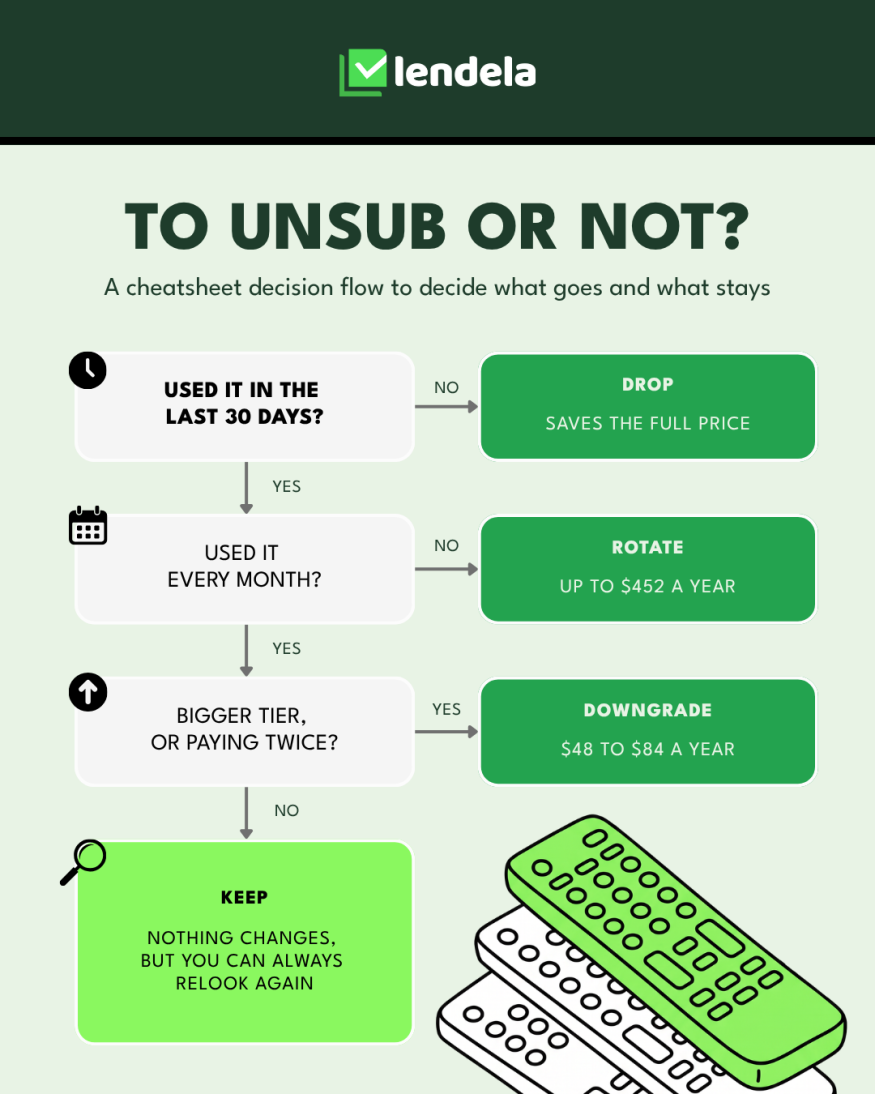
Everything above can be reduced to three questions, asked of each subscription in turn:
Question | If the answer is | Then | What it saves |
|---|---|---|---|
Used it in the last 30 days? | No | Drop it | The full price from the next bill: $4.99 to $22.98 a month in the example stack |
Used it every month? | No | Rotate it | Up to about $452 a year in the rotation illustration |
On a bigger tier, or paying twice? | Yes | Downgrade it | $48 to $84 a year per tier. A duplicate 2TB cloud plan is $167.76 a year |
None of the above | Keep it | Nothing changes, though it's worth looking again every so often |
Two cautions apply to the first outcome:
Annual plans. If you've paid for one, dropping it mid-year only saves anything from the next renewal, so note the renewal date and cancel before it.
Cloud storage is a special case, because it holds your photos. Not having opened it in 30 days doesn't mean it's safe to cancel, so check what's stored and where it's backed up first.
Can you build your own instead of subscribing?
Everything so far swaps one plan for another, or pays for one less thing. A smaller group of people goes further and replaces a subscription with something they run themselves. It's less common, it isn't free, and it won't suit everyone, so here is the honest version.
Idea | What it does | Cost | The catch |
|---|---|---|---|
A photo server on a Raspberry Pi or NAS (Immich) | Backs up your phone's photos to your own device, instead of a paid cloud plan | The software is free. One 2026 guide estimates about US$80 to $150 for a Pi setup and $200 to $500 for a NAS, one-time | One failed drive loses your photos unless you also keep a backup. One source found that with offsite backup and electricity included, it may not beat a 2TB cloud plan over five years |
A subscription tracker on a Pi (Wallos) | Lists your subscriptions with due dates and categories, and can show renewals in your calendar | Free, open-source software | You enter each subscription by hand, with no bank sync. An optional AI feature can call ChatGPT, Gemini or a local model, and a cloud model sees your subscription list |
Network ad blocking with Pi-hole | Blocks known ad domains for every device on your home network | Cheap to run | It can't separate YouTube's ads from its videos, and YouTube says ad blockers go against its terms. The supported route is Premium or the cheaper Premium Lite |
The tracker is the easiest win of the three, because it costs nothing and tells you what you're paying for.
The photo server is a real option for people who enjoy tinkering, but the saving is smaller than it looks once a backup is included, and you take on the responsibility of looking after your own photos.
Running a local AI model on a Raspberry Pi: we didn't find evidence that it's practical for any of this, so we wouldn't count on it.
We've left out shared logins and unofficial streams. Both run against the services' terms, and neither is a saving worth the risk.
How do you check what you're subscribed to?
All of the above starts from one thing: knowing what you're actually paying for. The audit takes about five minutes, and you may well find one you'd forgotten.
Where to look | How |
|---|---|
iPhone | Settings, tap your name, then Subscriptions |
Android | Play Store, then Payments and subscriptions |
Card statements | Scan the last two or three months for recurring charges, including small ones, since some subscriptions are billed directly and don't appear in your app store |
Your calendar | Add the renewal date of each annual plan, so you decide before it renews, not after |
None of this means giving up what you enjoy. It means seeing the total, then choosing. Compare first, then decide.
The same exercise works on most things worth budgeting for in Singapore. We've looked at how a sale price is made up before 11.11 and what ten years did to the cost of living here, in the same sourced, dated way.
Frequently asked questions
How much does Netflix cost in Singapore? Netflix lists three plans in Singapore as at October 2026: Basic at $15.98 a month, Standard at $22.98 and Premium at $29.98. An extra member costs $7.98 a month. Netflix says it does not offer annual plans.
Is it cheaper to pay for streaming services annually? Sometimes. Disney+ Standard is $159.98 a year against $227.76 for 12 monthly payments, a saving of $67.78, and HBO Max Standard is $129.98 a year against $173.76, a saving of $43.78. Amazon Prime is $49.90 a year against $59.88. Netflix has no annual plan. An annual plan is paid upfront, so it only pays off if you would use the service all year.
How much is YouTube Premium Lite in Singapore? YouTube Premium Lite is $8.98 a month, against $15.98 for YouTube Premium, a difference of $84 a year. Lite includes fewer features, and YouTube notes that ads can still appear in some places such as search and browse, so check what is included before switching.
Does Google AI Pro include YouTube Premium Lite in Singapore? Google's Singapore page lists Google AI Pro at $28.99 a month with 5 TB of storage and says it includes the YouTube Premium Lite plan, with availability varying by country. Google AI Plus is $6.98 a month for 400 GB.
How much is iCloud+ in Singapore? Apple's Singapore page lists iCloud+ at $1.48 a month for 50GB, $3.98 for 200GB, $13.98 for 2TB, $42.98 for 6TB and $84.98 for 12TB, as at October 2026.
How do I check my subscriptions on iPhone or Android? On an iPhone, go to Settings, tap your name, then Subscriptions. On Android, open the Play Store and go to Payments and subscriptions. Then scan your card statements for recurring charges, including small ones, since some subscriptions are billed directly rather than through the app store.
Is rotating streaming services actually cheaper? It can be. Keeping Netflix Standard, Disney+ Standard and HBO Max Standard all year costs $677.28. Keeping each for four months, one at a time, costs $225.76, a saving of $451.52. This is an illustration, and it only works if you want one service at a time.
Can I block YouTube ads with a Raspberry Pi? Not reliably. Tools such as Pi-hole block ads at the network level, but YouTube's ads come from the same places as its videos, so they cannot be separated, and YouTube says ad blockers go against its terms. The supported options are YouTube Premium or the cheaper Premium Lite.
Is it worth running my own photo storage instead of paying for iCloud+? It can work for people who enjoy tinkering, but it is not free. One 2026 guide estimates about US$80 to $150 for a Raspberry Pi setup or $200 to $500 for a NAS, plus a backup, since a failed drive can lose your photos. One source found that once offsite backup and electricity are included, it may not beat a cloud plan over five years.
Sources
Netflix Help Centre, Plans and pricing, Singapore, read 26 October 2026
Disney+ Singapore, subscription plans, read 26 October 2026
HBO Max Singapore, plans, read 26 October 2026
Amazon.sg, Amazon Prime, read 26 October 2026
YouTube Premium, Singapore, read 26 October 2026
Apple Singapore, iCloud+, read 26 October 2026
Google One, Google AI plans with cloud storage, Singapore, read 27 October 2026
StarHub, Best Streaming Services in Singapore, for the Disney+ bundle price and contract term
Planner Bee, 5 Clever Subscription Hacks To Help You Save Money, for the general tips only
Raspberry Pi, Immich, Wallos and Pi-hole: project documentation and 2026 self-hosting guides, for the cost estimates and limits described
Prices verified as at 26 and 27 October 2026 and can change without notice. Rotation figures and the example stack are illustrations, not recommendations, and your own situation will differ. Please check each provider's current page before making any decision.
The Lendela Team
Lendela is a loan-matching platform that partners with 70+ banks and financial institutions. We aim to deliver a transparent, safe, and personalised loan-matching experience, empowering borrowers with confidence to choose what truly fits. Since launching in 2018, we’ve helped hundreds of thousands of Singaporeans make smarter, more informed financial decisions through clarity and control.